
A CAA record (Certification Authority Authorization record) is a DNS record that specifies which certificate authorities (CAs) are permitted to issue TLS/SSL certificates for a domain. For example, a CAA record on the dnscheck.co domain can declare that only letsencrypt.org is allowed to issue certificates for that domain. A domain name can have multiple CAA records.
CAA records are defined in RFC 8659. Since September 2017, the CA/Browser Forum has required public certificate authorities to check CAA records before issuing a certificate, so a misconfigured or missing CAA record can either let the wrong CA issue a certificate for your domain or block the right one from doing so.
DNS Check can monitor your CAA records and notify you if they become unresolvable, or if their values change. For example, the following screenshot shows how to create a CAA record monitor that authorizes Let's Encrypt to issue certificates for example.com:
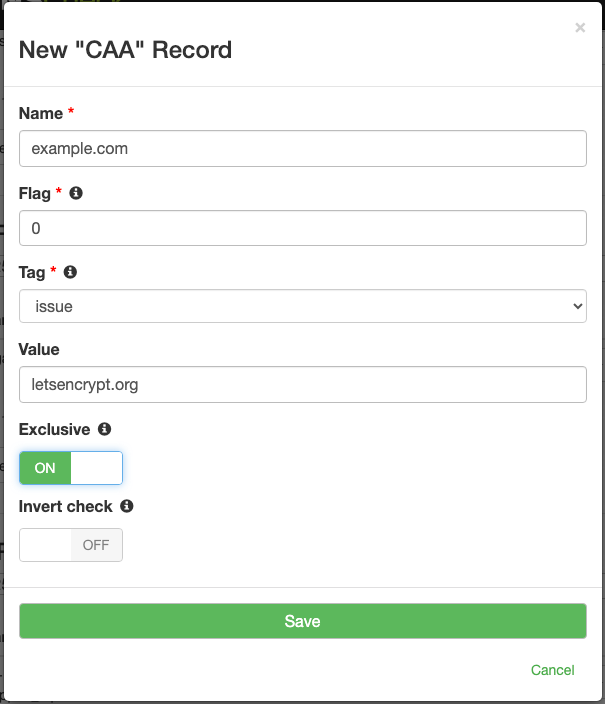
Fields
Here are the fields that make up a CAA record:
| Field | Description | Example |
|---|---|---|
| Name | A fully qualified domain name (FQDN). | dnscheck.co. |
| Type | The DNS record type. Always set to "CAA". | CAA |
| Flag | An unsigned 8-bit integer that controls how the record is interpreted. Use 0 unless you have a specific reason to do otherwise. | 0 |
| Tag | Controls how the Value field is interpreted. The most common tag is issue. See the Tags section below for the full list of supported tags. | issue |
| Value | The property value, whose meaning depends on the tag. For issue and issuewild, the domain name of the authorized CA (or an empty string to disallow all CAs); for iodef, a mailto: or http(s):// URL. | letsencrypt.org |
A few details on the Flag field warrant more explanation. In practice, the Flag is either 0 or 128, and almost every CAA record in the wild uses 0. The reason for this is that the Flag is an 8-bit field in which only one bit has been assigned a meaning: the high-order bit, with a decimal value of 128. That bit is the "issuer critical" flag, so a Flag of 128 means critical and a Flag of 0 means non-critical. The distinction matters when a CA encounters a record whose tag it does not recognize: if the critical bit is set, the CA must refuse to issue; if it is not set, the CA may ignore the record and proceed.
For the Value field, issue and issuewild records can carry additional parameters defined in RFC 8657. The CA domain comes first, then a semicolon, then one or more name=value parameters separated by semicolons. The two standardized parameters are accounturi (which binds the authorization to a specific ACME account, so an attacker who controls a different account at the same CA cannot issue) and validationmethods (which restricts which ACME challenge types the CA is allowed to use, e.g., dns-01). For example, 0 issue "letsencrypt.org; accounturi=https://acme-v02.api.letsencrypt.org/acme/acct/12345; validationmethods=dns-01" says that only Let's Encrypt may issue, and only when the request comes from that specific account using DNS-01 validation.
Tags
The Tag field controls how the Value field is interpreted. Note that the absence of any CAA records on a domain (or any of its parent domains) means that any CA may issue certificates for it. As soon as a single issue record exists, only the listed CAs are permitted. Every other CA is implicitly disallowed.
The following tags are supported in DNS Check's editor. Zone file imports also accept any other tag whose name matches the RFC 8659 syntax.
| Tag | Description | Example Value |
|---|---|---|
| contactemail | An email address for contacting the domain holder. Some CAs treat this as supplemental Domain Control Validation contact information, defined by the CA/Browser Forum. | [email protected] |
| contactphone | A phone number for contacting the domain holder. Used the same way as contactemail, and also defined by the CA/Browser Forum. | +1.5555551212 |
| iodef | A URL where certificate issuance violations should be reported. Either a mailto: URL or an http(s):// URL. | mailto:[email protected] |
| issue | Authorizes the named CA to issue certificates for this domain. By far the most commonly used tag. | letsencrypt.org |
| issuemail | Authorizes the named CA to issue S/MIME certificates for this domain. Defined in RFC 9495. | letsencrypt.org |
| issuevmc | Authorizes the named CA to issue Verified Mark Certificates (used with BIMI) for this domain. Defined by the BIMI Group. | digicert.com |
| issuewild | Authorizes the named CA to issue wildcard certificates for this domain. If no issuewild record exists, wildcard issuance follows the issue records. | letsencrypt.org |
DNS Zone File Examples
Here's an example of how CAA records look in a DNS zone file:
; Name          Type   Flag   Tag         Value
dnscheck.co.    CAA    0      issue       "letsencrypt.org"
dnscheck.co.    CAA    0      issuewild   "letsencrypt.org"
dnscheck.co.    CAA    0      iodef       "mailto:[email protected]"
The Name ends in a period in the above example, so it's a fully qualified domain name. The Value is wrapped in double quotes. This is part of the zone file format and is required.
Alternatively, you can create CAA records that are relative to the zone file's $ORIGIN. Here's an example of how to do this to create DNS records that are equivalent to what's shown in the previous example:
$ORIGIN dnscheck.co.
; Name          Type   Flag   Tag         Value
@               CAA    0      issue       "letsencrypt.org"
@               CAA    0      issuewild   "letsencrypt.org"
@               CAA    0      iodef       "mailto:[email protected]"
Additional Resources
- RFC 8659 - this RFC defines CAA records.
- RFC 8657 - this RFC defines the accounturi and validationmethods parameters for issue and issuewild values.
- RFC 9495 - this RFC defines the issuemail tag for authorizing S/MIME certificate issuance.
- CA/Browser Forum - publishes the Baseline Requirements that mandate CAA checking by public CAs, and defines the contactemail and contactphone tags.
- BIMI Group VMC Requirements - defines the issuevmc tag for authorizing Verified Mark Certificate issuance.
- IANA Certification Authority Restriction Properties - the registry of standardized CAA tags.

Protect your DNS infrastructure with automated monitoring
Get notified immediately when DNS records change. Start monitoring your critical DNS infrastructure for free in under 5 minutes.
No credit card required • Cancel anytime