
DNS load balancers respond to queries with one or more of the DNS records that they are configured to split the load between. This is done to distribute the load between multiple servers, provide redundancy, and reduce latency.
The simplest form is round robin DNS, where a name server varies the order of the records it returns so that different clients connect to different servers.
DNS Check supports monitoring A record (IPv4), AAAA record (IPv6), and CNAME record (IPv4 and IPv6) based load balancers. It notifies you if a record becomes unresolvable or starts resolving to the wrong addresses.
Load balancer records need a Professional or Enterprise plan. See the pricing page for what each plan includes.
How Round Robin DNS Works
Most clients connect to the first address in the response, so varying the order sends one client to one server, and the next client to another. Rotating the records is all that the name server does. It knows nothing about the servers behind them, so it keeps handing out the address of a server that is down, and it has no way to tell that one server is busier than another.
Caching shapes the split as well. Until the record's TTL expires, a resolver answers from its cache, and it may hand the same ordering to every client behind it. Resolvers differ in whether they rotate the records they've cached, and each one serves a different number of clients, so traffic is rarely divided evenly between the servers.
Round robin is not the only option. Managed DNS providers, such as Amazon Route 53, offer routing logic that takes more into account than the order of the records. A load balancer might return only the records that point to healthy servers, return one of its records chosen at random for each request, weight the responses so that some servers receive more traffic than others, or return records based on the querying IP address's geographic location.
DNS Check monitors all of these, because it checks the records that come back rather than the logic that selected them.
Load Balancer Logic
DNS Check compares the list of IP addresses or domain names that you enter to the records returned in response to a DNS query. If the records returned are either a subset or an exact match of those that were entered, the check passes.
If any of the records returned in response to the DNS query were not entered into DNS Check, the check fails.
The order in which records are entered into DNS Check and returned in response to queries does not matter.
Fields
Here are the fields that make up a DNS load balancer record:
| Field | Description | Example |
|---|---|---|
| Name | A fully qualified domain name (FQDN). | www.dnscheck.co. |
| Type | The DNS record type. Set to "A" for IPv4, "AAAA" for IPv6, or "CNAME". | A |
| Addresses | A comma or newline-delimited set of IP addresses, CIDR ranges (e.g., 104.16.0.0/13), or domain names. A minimum of 1 and a maximum of 30 entries are supported per monitored load balancer. Each CIDR range counts as one entry. |
104.131.72.189, 143.198.237.244, 52.48.61.155 |
DNS Zone File Examples
Here's an example of how an A record load balancer could look in a DNS zone file:
; Name                   Type  Address
nameservers.dnscheck.co. A     104.131.72.189
nameservers.dnscheck.co. A     143.198.237.244
nameservers.dnscheck.co. A     52.48.61.155
If the above zone file is imported into the BIND DNS server, then it will respond to queries for the nameservers.dnscheck.co DNS record with all three records shown above, varying their order from one response to the next. That's round robin DNS.
When you export a record group from DNS Check, load balancer records are written differently. Because a load balancer is a single record holding several values, and may use CIDR ranges that are not standard zone file syntax, DNS Check lists them as comments at the end of the forward zone file. Standard DNS servers ignore these comments, so the exported file stays fully compatible with any DNS server, and you can import it back into DNS Check at any time to restore your load balancers.
The same load balancer is exported by DNS Check like this:
; ===================================================================
; The records below can't be written in standard zone file syntax,
; so DNS Check exports them as comments. Standard DNS servers ignore
; them. Re-import this file into DNS Check to restore them.
; ===================================================================
; DNS Check load balancer records: https://www.dnscheck.co/load-balancer-record-monitor
; nameservers.dnscheck.co. A 104.131.72.189, 143.198.237.244, 52.48.61.155
; === End DNS Check load balancer records ===
CIDR Range Monitoring
Some providers, such as Cloudflare, serve content from large IP pools. Instead of listing every possible IP address, you can use CIDR notation to monitor that DNS responses fall within the expected range.
For example, Cloudflare publishes its IP ranges at cloudflare.com/ips. You can enter these ranges as load balancer addresses to monitor a Cloudflare-proxied domain:
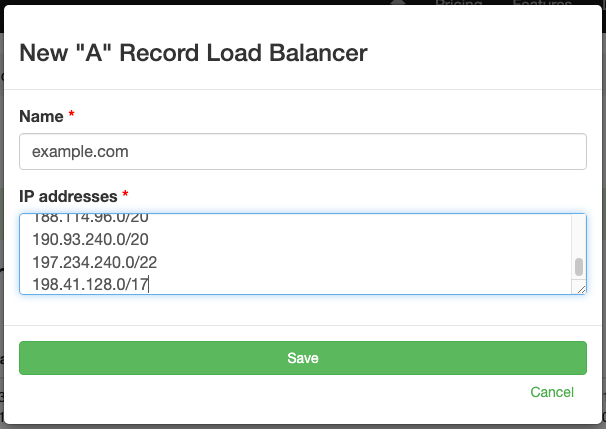
If a DNS query for the domain returns IP address within any of the specified CIDR ranges, the check passes. If it returns an IP outside the ranges, the check fails.
You can paste IP ranges directly from a provider's website. For example, you can copy the ranges listed at cloudflare.com/ips and paste them into the addresses field as a newline-delimited list. The newlines are automatically converted to commas when the record is saved.
Additional Resources
- HOWTO - Configure Load Balancing - a section from Pro DNS and BIND that discusses load balancers in the BIND name server.
- Choosing a Routing Policy - documentation on some of the DNS-based load balancing options available in Amazon Route 53.

Protect your DNS infrastructure with automated monitoring
Get notified immediately when DNS records change. Start monitoring your critical DNS infrastructure for free in under 5 minutes.
No credit card required • Cancel anytime