
Guided DNS Troubleshooting, Full History, and UI Improvements
We're kicking off 2026 by shipping improvements that make DNS troubleshooting faster and more intuitive. When a DNS check fails, you'll now see exactly what needs to change to fix it, and you'll have complete visibility into your DNS record behavior over time.
Suggested Fix Report
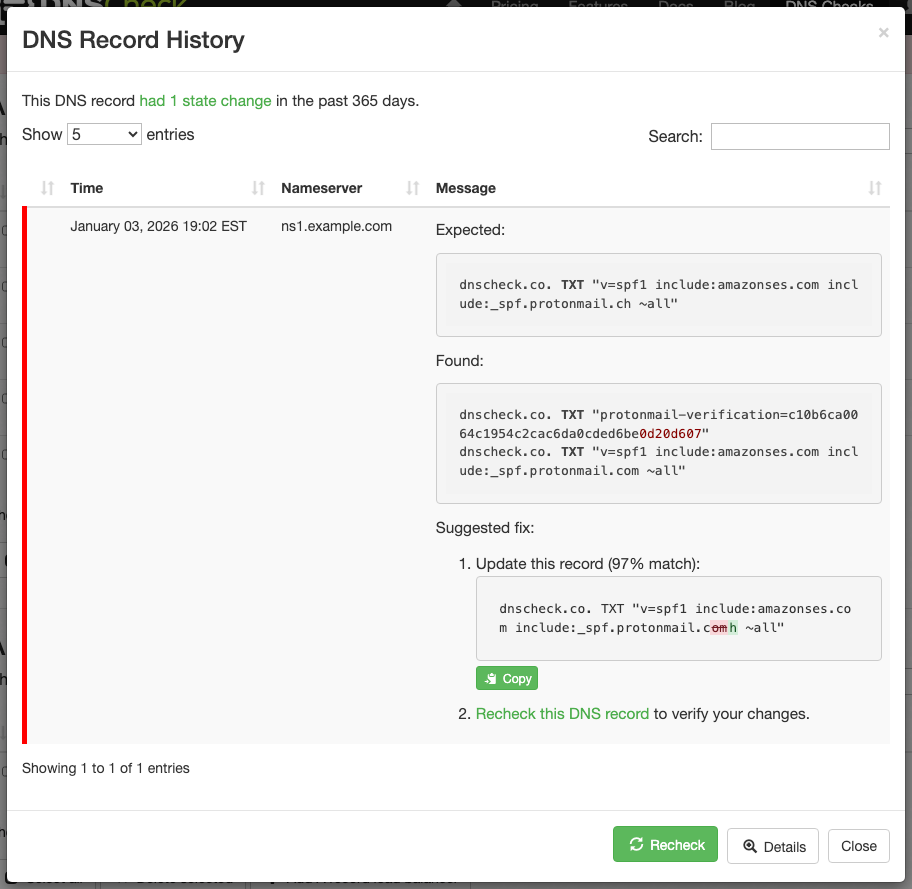
When a DNS record check fails, the new Suggested fix report shows exactly what action you need to take. Instead of manually comparing "Expected" vs "Found" records character-by-character, DNS Check now performs that comparison for you and presents clear guidance.
Create this record: When an expected DNS record is completely missing from your DNS configuration, the report displays the full record you need to create, highlighted in green. This makes it immediately clear that the record doesn't exist and needs to be added.
Update this record: When a DNS record exists but contains a typo or hasn't yet incorporated a minor update, the report highlights the exact characters that are incorrect. Incorrect characters are highlighted in red strikethrough, while the correct replacement characters are highlighted green. A match percentage helps confirm when a difference is likely a typo rather than a completely wrong value.
Delete this record: For exclusive DNS checks where extra unwanted records exist alongside the correct one, the report shows which records to delete, highlighted in red.
This improvement is particularly valuable for long SPF or TXT records where a single typo can be buried in a string of dozens of characters. What previously required careful manual comparison now takes a glance.
Complete DNS Record History
Previously, the "Notification History" report only showed state changes that triggered email notifications. This created gaps in your visibility when notifications were disabled, when "suppress notification of pass" was enabled, or during initial record setup.
DNS Check now records all state changes, regardless of whether a notification was sent. The report was renamed to "History" to reflect this broader scope. You can now see:
- Initial check results when a new DNS record is first added
- ServFail errors (even when the delay slider, described below, prevents email notifications)
- All transitions, not just those that triggered emails or other notices
This complete history makes troubleshooting easier because you can see exactly what happened to a DNS record over time, independent of your notification preferences.
Redesigned Notification Settings
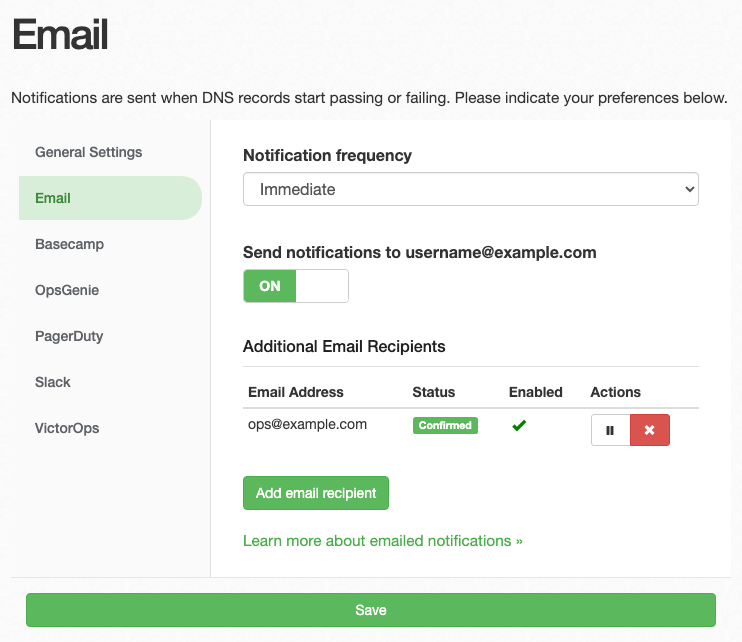
The notification settings interface was redesigned for better usability on both desktop and mobile devices.
Improved navigation: Desktop displays a sidebar for quick access to each notification type. Mobile uses a drill-down navigation pattern that makes better use of limited screen space.
ServFail delay slider: The ServFail delay setting is now an interactive slider with a value bubble and contextual description, replacing the previous text input. This makes it easier to understand and adjust the amount of time DNS Check waits before alerting on ServFail errors.

Better mobile experience: Dropdown menus auto-scroll into view, action buttons stack vertically for easier tapping, and touch targets on buttons and toggle switches are larger.
Additional Improvements
-
Pass/fail feedback when adding DNS records: You now see diagnostic notifications when creating DNS records, confirming whether the newly added record passes or fails its initial check.
-
Responsive DNS Record History view: The history view adapts better to mobile screens, matching the responsive design already used for viewing DNS record groups.
-
Visual feedback on rechecks: A subtle fade effect now highlights when DNS record status updates after a recheck, making it clear that a refresh occurred.
These updates are available now for all DNS Check accounts. For questions about these features, visit our FAQ or contact us.