
Monitor CAA Records with DNS Check
DNS Check now supports monitoring CAA records. A CAA (Certification Authority Authorization) record tells public certificate authorities (CAs) which of them, if any, are allowed to issue TLS/SSL certificates for your domain. Public CAs have been required to honor these records since 2017, so a CAA record is effectively an access control list for certificate issuance.
The failure modes are worth taking seriously. When a CAA record disappears, changes, or adds an entry for a CA you didn't authorize, the result can range from a renewal failing at the worst possible time to someone else obtaining a valid certificate for your domain.
Why CAA Records Are Worth Monitoring
A domain with no CAA records, and no CAA records on any parent domain, can be certified by any public CA. Add a single issue record like 0 issue "letsencrypt.org" and you've narrowed that to one CA. That only holds while the record is actually in DNS and still points at the CA you mean to use, which is exactly the part that tends to drift:
- Accidental removal. A zone edit, a migration, or a botched provider change drops your CAA records. The domain reverts to "any CA can issue," and nobody notices because nothing visibly breaks.
- Unauthorized additions. A new
issuerecord appears for a CA you don't use. A security team wants to know about that right away. - Parameter drift. If you've used the RFC 8657 parameters to pin issuance to a specific ACME account (
accounturi) or challenge type (validationmethods), a change to either one can widen your attack surface or break a working renewal without the record looking obviously different.
DNS Check handles these the same way it handles any other record: it polls your authoritative name servers on a schedule and compares each response against your configuration.
What DNS Check Supports
CAA monitoring covers the full set of tags from RFC 8659 and its follow-ups:
issueauthorizes a CA to issue certificates for the domain.issuewildoverridesissuefor wildcard certificates.iodefis the URL or mailto address where issuance violations get reported.issuemailauthorizes S/MIME certificate issuance (RFC 9495).issuevmcauthorizes Verified Mark Certificates used with BIMI.contactemailandcontactphoneare the CA/Browser Forum domain holder contact tags.
The RFC 8657 parameters on issue and issuewild (accounturi and validationmethods) work too, so you can monitor records that pin issuance to a specific ACME account or challenge type:
example.com. CAA 0 issue "letsencrypt.org; accounturi=https://acme-v02.api.letsencrypt.org/acme/acct/12345; validationmethods=dns-01"
Setting Up a CAA Record Check
To add a CAA check from the DNS record group page:
- Click "Add DNS record".
- Select "CAA" as the record type.
- Enter the name, flag (almost always 0), tag, and value.
- Save the record.
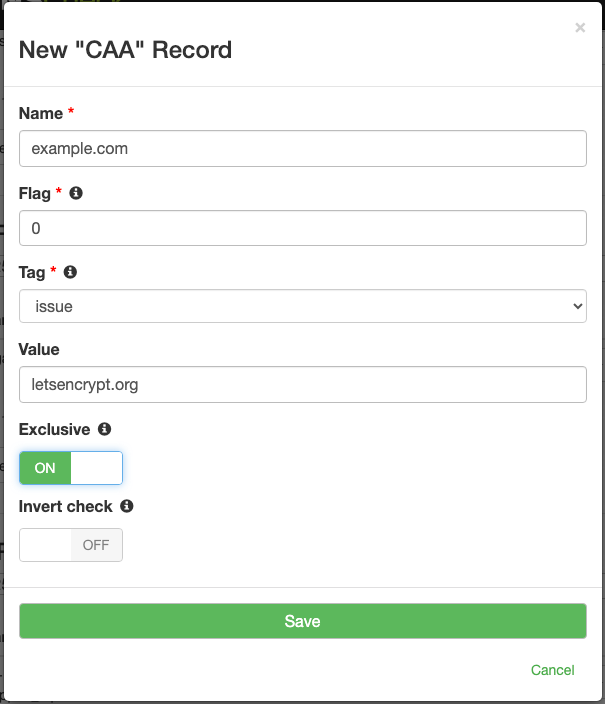
If you'd rather not click through the form for every record, paste in a zone file with your existing CAA records and DNS Check will import them. The importer accepts any tag that's valid under RFC 8659, so unusual or vendor-specific tags come through even when the add-record form doesn't list them in its dropdown.
When a CAA record changes, you'll hear about it through your usual notification channels: email, Slack, PagerDuty, webhooks, and the rest.
Available on Every Account
CAA record monitoring is available on every DNS Check account, including free plans. There's no upgrade to buy and nothing to enable. If you've been putting off CAA records because a typo silently breaking a TLS renewal sounds worse than having no CAA records at all, monitoring removes most of that risk: DNS Check queries your CAA records every few minutes and alerts you the first time one disappears or changes, which gives you time to fix it before the next renewal.
For the full reference, including the tag list, flag semantics, and zone file examples, see the CAA record monitoring documentation. If you're new here, create a free DNS Check account and start monitoring your DNS records.