
An SVCB record (Service Binding record) is a DNS record that tells clients how to reach a service, including the transport parameters they need to connect, such as the supported protocols, port, and address hints. This lets a client begin setting up a connection to an alternative endpoint without first resolving a series of additional records. A domain name can have multiple SVCB records.
SVCB records are defined in RFC 9460. The closely related HTTPS record is the HTTPS-specific instantiation of SVCB and shares the same format. SVCB is used for services other than HTTP, with the service and scheme indicated by a prefixed owner name (for example, _dns.example.com for a DNS-over-HTTPS resolver).
DNS Check can monitor your SVCB records and notify you if they become unresolvable, or if their values change. For example, the following screenshot shows how to create an SVCB record monitor for a DNS-over-HTTPS endpoint:
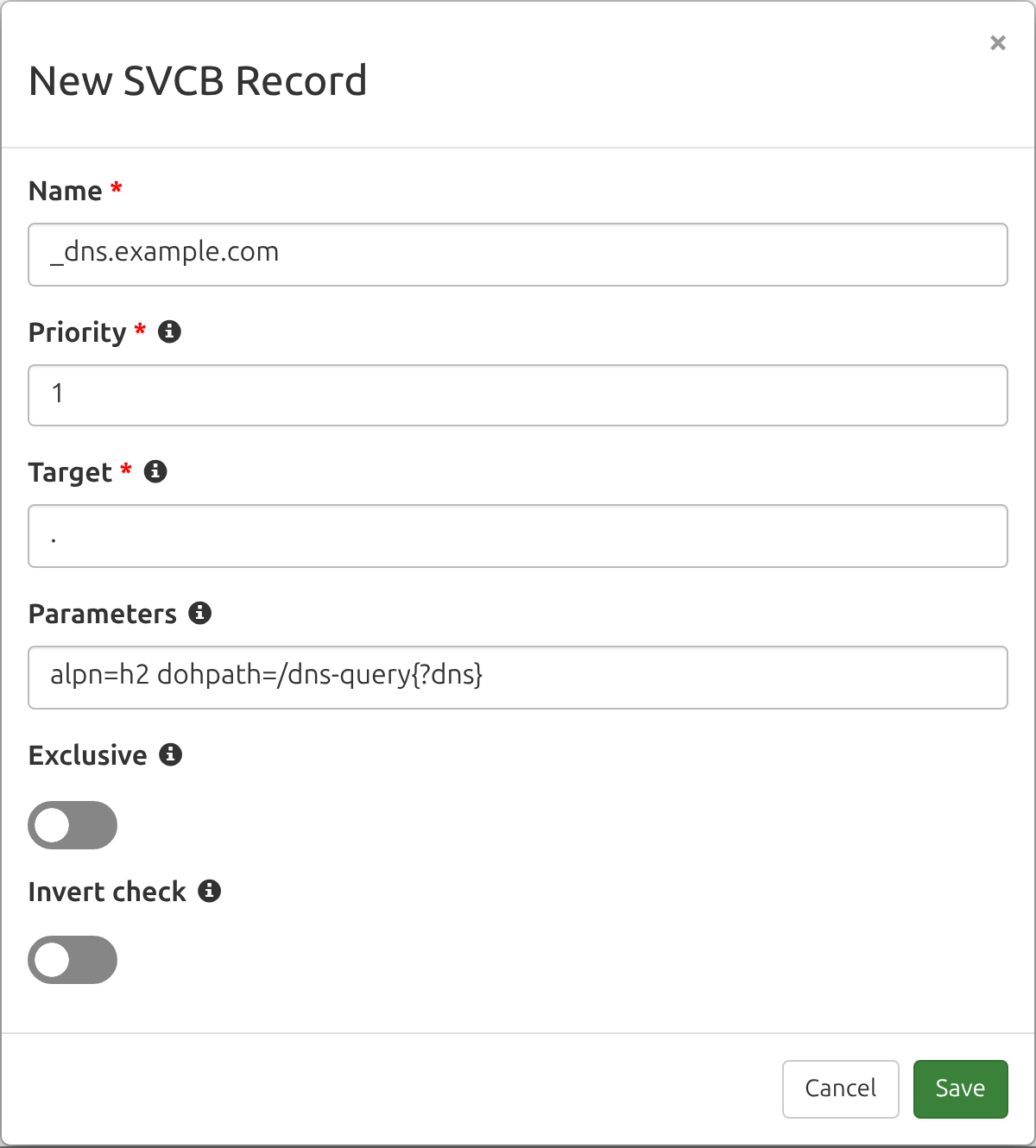
Fields
Here are the fields that make up an SVCB record:
| Field | Description | Example |
|---|---|---|
| Name | A fully qualified domain name (FQDN), often prefixed with an underscore-labelled service and scheme. | _dns.example.com. |
| Type | The DNS record type. Always set to "SVCB". | SVCB |
| Priority | The SvcPriority, an unsigned 16-bit integer. A value of 0 is AliasMode: the Target names another service and no parameters are present. A non-zero value is ServiceMode, where the parameters describe how to reach the endpoint. Lower non-zero values are preferred. | 1 |
| Target | The TargetName: the domain name of the endpoint providing the service. A single dot (.) means the service is at the owner name itself. |
svc.example.net. |
| Parameters | The SvcParams: zero or more key=value pairs describing the endpoint (see the Parameters section below). Present only in ServiceMode. |
alpn=h2,h3 port=443 |
DNS Check gives the Priority, Target, and Parameters their own fields in the record form, so each one can be checked, wildcarded, and reported on separately.
Parameters
In ServiceMode, the Parameters field carries one or more SvcParams as space-separated key=value pairs. Every parameter has both a mnemonic name and a number assigned by the IANA Service Binding (SVCB) Parameter Registry, and that number decides the order the parameters are stored in.
DNS Check accepts the mnemonics listed below. Any other key can be entered in the generic keyNNNNN form, where NNNNN is the decimal key number from 0 to 65534 (65535 is reserved and always invalid). That form covers registered keys whose mnemonic DNS Check doesn't recognize, such as key9 for TLS supported groups, keys whose mnemonic is so far only defined in an Internet-Draft, and the private-use range that starts at key65280.
| Key | Number | Description | Example Value |
|---|---|---|---|
| mandatory | 0 | A comma-separated list of the parameter keys that a client must understand to use this record. Every key listed has to be present in the record. | alpn,port |
| alpn | 1 | A comma-separated list of the Application-Layer Protocol Negotiation identifiers the endpoint supports. | h2,h3 |
| no-default-alpn | 2 | A value-less key indicating that the default ALPN protocol for the scheme is not supported. Requires an alpn parameter alongside it. | (no value) |
| port | 3 | The TCP or UDP port on which the endpoint provides the service. | 443 |
| ipv4hint | 4 | A comma-separated list of IPv4 address hints for the endpoint, used to start a connection before resolving the Target's A records. | 192.0.2.1 |
| ech | 5 | The Encrypted ClientHello configuration for the endpoint, in Base64. | AEX+DQBBnAAg...AAA= |
| ipv6hint | 6 | A comma-separated list of IPv6 address hints for the endpoint, used the same way as ipv4hint is for AAAA records. | 2001:db8::1 |
| dohpath | 7 | The URI template for a DNS-over-HTTPS endpoint, defined in RFC 9461. | /dns-query{?dns} |
| ohttp | 8 | A value-less key indicating that the endpoint is an Oblivious HTTP target, defined in RFC 9540. | (no value) |
| docpath | 10 | The resource path for a DNS-over-CoAP endpoint, as a comma-separated list of path segments, defined in RFC 9953. The root path is an empty value, written as the bare key. | n,s |
The two value-less keys, no-default-alpn and ohttp, are entered as the bare key with no equals sign, alongside any other parameters: alpn=h2 no-default-alpn. A key given an empty value means the same thing and is stored the same way, so docpath= is stored as a bare docpath, which is how RFC 9953 writes the DNS-over-CoAP root path.
The ech example above is abbreviated so it fits in the table. A real ech value is a few hundred characters long. Enter the complete Base64 ECHConfigList exactly as your provider publishes it, since DNS Check rejects a value that isn't valid Base64.
Looking Up an SVCB Record
You can look up SVCB records yourself with the dig command. Cloudflare publishes SVCB records that describe how to reach its public resolver:
dig +short _dns.cloudflare-dns.com SVCB
That returns one record per endpoint:
1 one.one.one.one. alpn="h3,h2" key7="/dns-query{?dns}"
2 one.one.one.one. alpn="dot"
Reading the first record: a Priority of 1 (ServiceMode, and the more preferred of the two records), a Target of one.one.one.one., support for HTTP/3 and HTTP/2, and a DNS-over-HTTPS path of /dns-query{?dns}. To monitor that record in DNS Check, enter 1 as the Priority, one.one.one.one. as the Target, and alpn=h3,h2 dohpath=/dns-query{?dns} as the Parameters. The second record offers DNS-over-TLS (alpn=dot) at the same Target, as a less preferred alternative.
Some versions of dig print parameters they don't recognize in the generic keyNNNNN form, which is why dohpath appears as key7 above. Either spelling can be pasted into DNS Check, quotes and all, and both are stored as dohpath.
Running that command without +short prints the records inside a block of ;-prefixed comment lines, which is valid zone file syntax, so the whole output can be pasted straight into DNS Check's zone file import.
How DNS Check Stores and Compares SVCB Records
RFC 9460 defines a canonical presentation form for these records, and DNS Check rewrites what you enter into that form when you save it. The same rewriting is applied to whatever your name servers return, so the two can be compared as plain text. This means the record you see in DNS Check may not be character-for-character what you typed. Four things change:
- The parameters are sorted by key number, which is not the same as alphabetical order. For example,
ipv6hint(6) is stored afteripv4hint(4) andech(5), even though it sorts before both alphabetically. - Quoting is removed and keys are lowercased.
ALPN="h2,h3"is stored asalpn=h2,h3, and a generic key is replaced with its mnemonic, sokey7=becomesdohpath=. - A relative Target is made absolute.
svc.example.netis stored assvc.example.net. - IPv6 hints are normalized to the canonical form described on the AAAA record page, so
2001:DB8::1is stored as2001:db8::1.
Together, those four rules mean that entering a Priority of 1, a Target of ., and Parameters of ipv6hint=2001:DB8::1 port=8443 alpn="h2,h3" stores the record as:
1 . alpn=h2,h3 port=8443 ipv6hint=2001:db8::1
When a check runs, the Priority and Target are compared case-insensitively, as domain names are everywhere else in DNS Check. The Parameters are compared exactly, because ech carries Base64 and dohpath a URI template, where letter case is significant.
Leaving the Parameters field empty is itself a check: it requires the record to have no parameters at all. To accept whatever parameters are published, use a wildcard instead (see the next section).
DNS Check validates the parameters as it saves them and reports what the problem was, rather than a generic error. Some examples:
Parameters are invalid (Unknown SvcParamKey: "boguskey")- the mnemonic isn't registered. Use thekeyNNNNNform for unregistered keys.Parameters are invalid (port must be an integer in 0..65535, got "99999")Parameters are invalid (no-default-alpn requires alpn)Parameters are invalid (mandatory lists alpn, which the record does not contain)Parameters must be empty when the priority is 0 (AliasMode)- an AliasMode record carries no parameters.
Monitoring with Wildcards
You can use an asterisk (*) as a wildcard for the Priority, the Target, the Parameters, or any combination of them. Each field is matched independently, so any combination of wildcarded and exact fields works. Here are some examples:
| Priority | Target | Parameters | Passes When |
|---|---|---|---|
1 |
. |
* |
A record exists with that Priority and Target, whatever parameters it carries, including none at all. |
* |
. |
alpn=h2,h3 |
A record has that Target and those exact parameters, regardless of its Priority. |
1 |
* |
alpn=h2,h3 |
A record has that Priority and those exact parameters, whichever endpoint it names as its Target. |
* |
* |
* |
Any SVCB record exists for the Name. |
A wildcard on the Parameters is the practical choice when part of the value rotates on its own. Encrypted ClientHello configurations are the common case: a provider that rotates its ech keys republishes the record on its own schedule, which would fail a check pinned to the exact parameters, even though nothing is wrong. Monitoring the Priority and Target exactly with * for the Parameters still catches the record disappearing or being pointed somewhere else.
By default, a wildcard check passes as long as at least one returned SVCB record matches, even if the Name has other SVCB records too. If you enable the Exclusive option, the full set of returned records must correspond one-to-one with the records you monitor. A single wildcard, such as Priority 1, Target ., and Parameters *, then passes only when exactly one SVCB record is returned, and it has that Priority and Target. To exactly match a Name that publishes several SVCB records, add a monitored record (wildcard or specific) for each one.
Our Wildcard DNS Records page covers wildcards across every record type, along with wildcard record names like *.example.com.
DNS Zone File Examples
Here's an example of how SVCB records look in a DNS zone file:
; Name                 Type   Priority  Target            Parameters
_dns.example.com.      SVCB   1         .                 alpn=h2 dohpath=/dns-query{?dns}
_dns.api.example.com.  SVCB   0         svc.example.net.
The first record is in ServiceMode (a non-zero priority) and describes a DNS-over-HTTPS endpoint at the owner name itself. The second is in AliasMode (priority 0), which points the service at svc.example.net and carries no parameters. A client following that alias queries svc.example.net for its own SVCB records.
Alternatively, you can create SVCB records that are relative to the zone file's $ORIGIN. Here's an example of how to do this to create DNS records that are equivalent to what's shown in the previous example:
$ORIGIN example.com.
; Name    Type   Priority  Target            Parameters
_dns      SVCB   1         .                 alpn=h2 dohpath=/dns-query{?dns}
_dns.api  SVCB   0         svc.example.net.
DNS Check can import and export zone files containing SVCB records, including records that use wildcard values.
Troubleshooting
SVCB is DNS record type 64 and HTTPS is type 65. Both are new enough that some resolvers, firewalls, and home routers still mishandle answers for record types they don't recognize. A good first troubleshooting step, if you see behavior that could be explained by an SVCB record not being seen, is to verify that the full technology stack supports the record type.
DNS Check and dig 9.18 and later both support checking SVCB records (run dig -v to see your version). Here's an example dig invocation:
dig @ns1.cloudflare-dns.com _dns.cloudflare-dns.com SVCB
That queries one of the authoritative name servers for cloudflare-dns.com, which publishes SVCB records for its public resolver, so an empty answer points at your copy of dig or the network in between rather than at the records. Once it returns them, swap in your own name and name server.
Not every DNS hosting provider supports publishing SVCB records yet, and some that do accept only a subset of the parameters.
See troubleshooting DNS records for more ideas.
Additional Resources
- RFC 9460 - this RFC defines SVCB and HTTPS records.
- RFC 9461 - this RFC defines the dohpath parameter and the use of SVCB for DNS-over-HTTPS.
- RFC 9540 - this RFC defines the ohttp parameter and the discovery of Oblivious HTTP targets.
- RFC 9848 - this RFC defines the ech parameter.
- RFC 9953 - this RFC defines the docpath parameter and the use of SVCB for DNS-over-CoAP.
- IANA Service Binding (SVCB) Parameter Registry - the registry of standardized SvcParamKeys and their numbers.

Protect your DNS infrastructure with automated monitoring
Get notified immediately when DNS records change. Start monitoring your critical DNS infrastructure for free in under 5 minutes.
No credit card required • Cancel anytime