
By default, a monitored DNS record asks a narrow question: is the value I expect among the records that come back? If it's there, the check passes, and any other records returned for the same name and type are ignored.
Whether that's what you want comes down to one decision: should the check assert anything about the complete set of records for that name and type? Often it shouldn't. An email provider monitoring a customer's domain cares that the SPF and DKIM records it issued are present and correct, and has no business failing a check because the customer publishes TXT records of their own. The default is right there.
When you do want to make that claim, the default leaves a gap, because an extra record is invisible. A second A record pointing somewhere unexpected, a leftover MX from a provider you've left, or a duplicate SPF record published by mistake all pass a default check. The Exclusive option closes it: the set of records returned must correspond exactly to the set you're monitoring, so anything extra fails.
Exclusive matching is available on every plan, including the free plan.
How Exclusive Matching Works
The difference is subset versus exact set. Say you monitor example.com as an A record with a value of 192.0.2.1:
| What DNS returns | Exclusive off | Exclusive on |
|---|---|---|
192.0.2.1 |
Passes | Passes |
192.0.2.1 and 192.0.2.99 |
Passes | Fails - a record you aren't monitoring was returned |
192.0.2.99 only |
Fails | Fails |
| Nothing (NXDOMAIN) | Fails | Fails |
Exclusive only ever makes a check stricter. Anything that fails without it still fails with it.
Monitoring Several Records for One Name
Plenty of names publish more than one record of the same type on purpose: several MX records for mail, several NS records for delegation, several A records behind a service. Exclusive is built for this, and it works differently from how a single-record option might suggest.
When a check with Exclusive enabled runs, DNS Check doesn't compare the returned records against that one monitored record. It gathers every record in the same DNS record group with the same name and type that also has Exclusive enabled, and compares the returned records against that whole set. The check passes when the two sets pair up one for one.
So to monitor a name that publishes three MX records, add three monitored MX records with that name, one per exchange, and enable Exclusive on all three. The check then passes only when DNS returns exactly those three.
The records don't have to be listed in any particular order. DNS Check pairs them up by value, not by position, and name servers are free to return them in any order.
Enable it on every record for the name, or none
This is the part worth getting right. Because the comparison set is built from records that have Exclusive enabled, a record you leave switched off is not part of it, and the record it matches in DNS counts as an unexpected extra.
Monitoring three MX records but enabling Exclusive on only two produces a confusing result: the two exclusive records fail, because DNS returns three records where their set expects two, while the third record passes on its own default subset check. Nothing is wrong with your DNS. The monitoring is asking a question that can't be satisfied.
Treat Exclusive as a property of the name, not of one record: switch it on for every monitored record sharing that name and type, or for none of them.
Exclusive and Wildcard Values
A wildcard value of * matches any answer, which makes counting matter more than matching. DNS Check requires the pairing to be one to one: each returned record is paired with a different monitored record, so one returned record can't satisfy several wildcards at once.
That combination is how you monitor a count rather than a value. A single A record with a value of * and Exclusive enabled passes only when the name returns exactly one address, whatever that address is. Two such records require exactly two. It's the check to use for "this name should publish one address, and I don't care which" - a CDN handing out a rotating address, say, where a second address appearing would be a real problem.
Wildcard names work too. A monitor for *.example.com with Exclusive enabled checks the full set of records the wildcard returns, using the randomly generated label each check queries.
What a Failure Looks Like
When the counts don't line up, the failure opens with the tally, such as Expected 2 records but found 3, followed by the records you're monitoring and the records DNS actually returned.
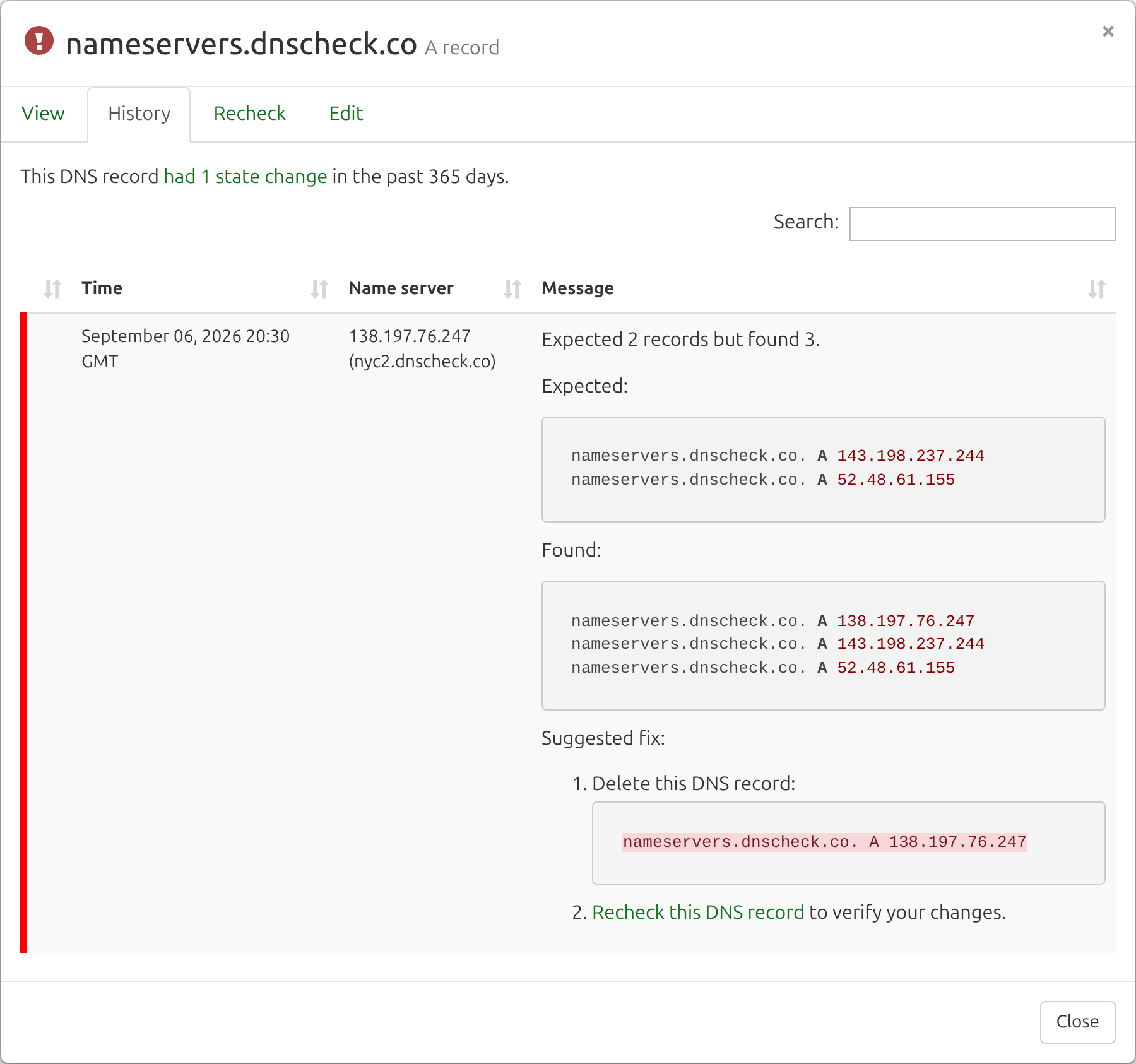
Exclusive failures also get two entries in the Suggested fix report that other checks never produce:
- Delete this DNS record - lists the returned records that aren't in your monitored set, as zone file lines, so you can see exactly what to remove from the zone. Only an exclusive check can know a record is surplus, because only an exclusive check is looking at the full set.
- Delete this duplicate record in DNS Check - the opposite problem. When the same record is entered into DNS Check more times than it appears in DNS, the surplus copies can never pair with anything, so the fix is to remove the extra copies from your record group rather than to change the zone.
Require Exact Match on ALIAS Records
On an ALIAS record, this same option appears under a different name: Require exact match. An ALIAS monitor compares two DNS lookups against each other rather than comparing one lookup to a value you typed, so "exclusive" would be the wrong word for what it does.
- Off - the Name lookup's results must be a subset of, or equal to, the Value lookup's results.
- On - the two lookups must return exactly the same set of records.
Use it when the two names are meant to stay in lockstep, and leave it off when the target legitimately returns more records than the ALIAS does.
What Exclusive Can't Be Combined With
- Invert check - an inverted check monitors for a record's absence, while Exclusive requires the returned set to match your monitored set exactly. The two ask contradictory questions, so enabling one disables the other in the record form.
- Load balancer records - a load balancer record already holds a set of acceptable values and passes when the returned addresses fall within it. That subset behavior is the point, so Exclusive isn't offered on load balancer records.
Exclusive and Zone File Imports
Exclusive isn't part of zone file syntax, since a zone file lists what exists rather than saying anything about monitoring. When you import a zone file, a Make imported records exclusive switch decides the setting for everything in the import.
Turning it on is usually right for a complete zone export, because the file lists everything the zone publishes: each name's set arrives complete, and the all-or-nothing rule above is satisfied for free. Leave it off for a partial file, one that covers only some of the records the names in it publish.
Inverted records in the file ignore the switch and are imported with Exclusive off, since the two options can't be combined.
Example Uses
| What you want to know | How to monitor it |
|---|---|
| Exactly one address is published for a name, and it's the right one | One A record monitor, Exclusive on |
| Mail routes only through the three exchanges you expect | Three MX record monitors, Exclusive on for all three |
| Your delegation is exactly the name servers you published | One NS record monitor per name server, Exclusive on for each |
| No second SPF record has appeared alongside the real one | One SPF (TXT) monitor, Exclusive on |
| Only the certificate authorities you authorize are listed | One CAA monitor per CA, Exclusive on for each |
| Exactly one address is published, whatever it happens to be | One A record monitor, value *, Exclusive on |
Additional Resources
- How to Monitor Multiple DNS Records with the Same Name and DNS Record Type - the blog post introducing exclusive matching across several records.
- Wildcard DNS Records - how the
*value behaves on its own, and what pairing it with Exclusive changes. - Monitor DNS Records - how to add and configure the records in a DNS record group.
- Troubleshoot DNS Records - what DNS Check reports when a check fails.

Protect your DNS infrastructure with automated monitoring
Get notified immediately when DNS records change. Start monitoring your critical DNS infrastructure for free in under 5 minutes.
No credit card required • Cancel anytime