
Ordinary DNS monitoring asks whether a record is present and correct. An inverted check asks the opposite question: it passes while a record is absent, or present with a value other than the one you entered, and fails as soon as the record you don't want appears.
Ordinary monitoring can't cover either situation. It only notices records that disappear or change, so it says nothing about a record that doesn't exist yet, or about a value that should never show up.
Inverted checks need a Professional or Enterprise plan. See the pricing page for what each plan includes.
How an Inverted Check Works
DNS Check runs the same query it would run for an ordinary check, then reverses the verdict:
| What DNS returns | Ordinary check | Inverted check |
|---|---|---|
| The record doesn't exist (NXDOMAIN) | Fails | Passes |
| The record exists, with the value you entered | Passes | Fails |
| The record exists, with some other value | Fails | Passes |
The value you enter is what the check is watching for, not what it wants.
A monitored record with Invert check enabled is marked INVERTED in the record group's list, so an inverted record isn't mistaken for a failing one at a glance.
Watching for a Record That Shouldn't Exist
To watch a name for any record of a given type appearing, enter * as the value and enable Invert check. A wildcard value means "any answer will do", so inverting it means "no answer at all".
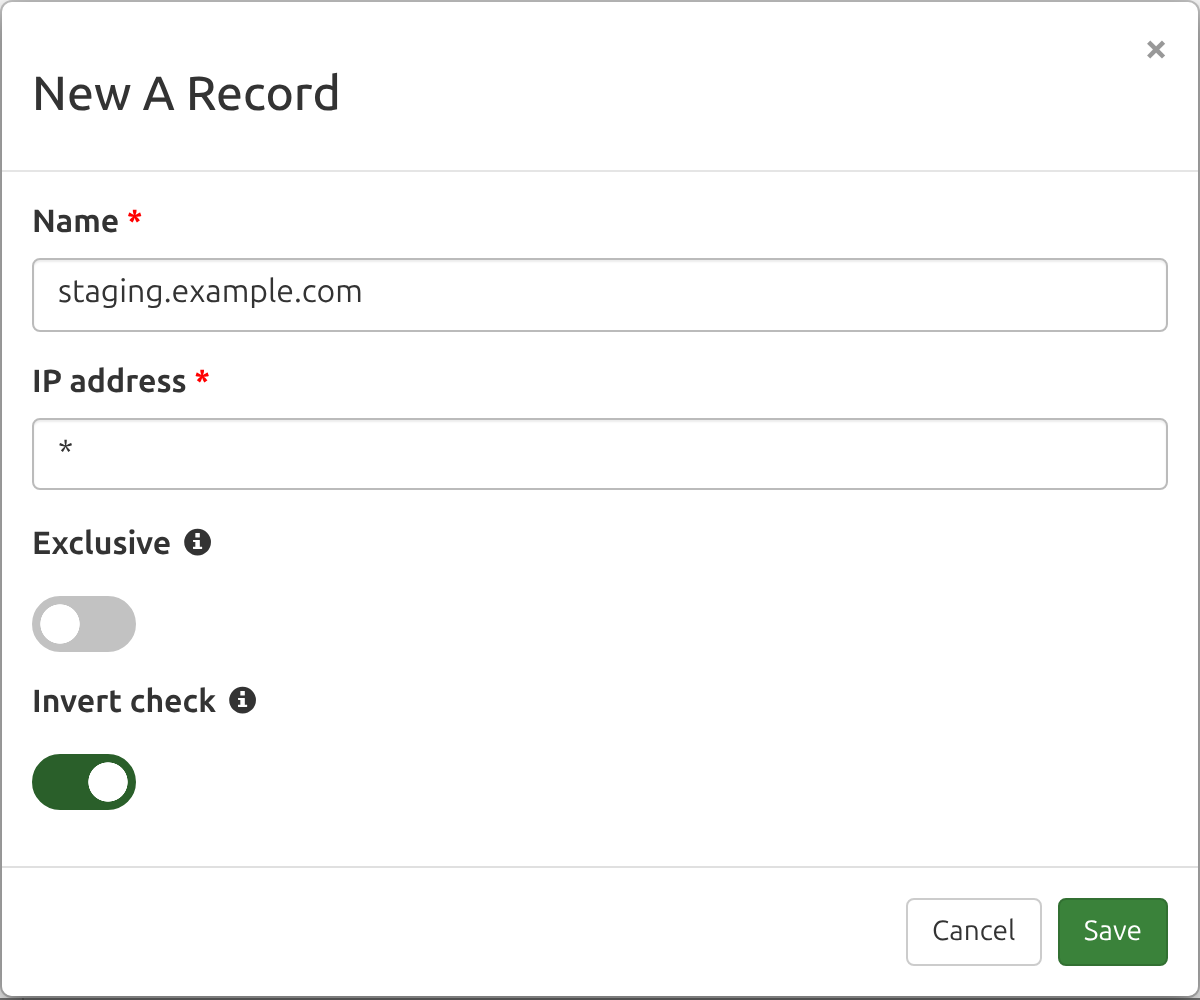
The check passes for as long as staging.example.com has no A record, and fails, notifying you, the moment one is published. Two situations call for this:
- A planned change you're waiting on. You know a record is coming and want to hear about it the moment it lands, so you can verify it rather than discovering it later.
- A record nobody should be publishing. Subdomain takeovers, forgotten staging hosts, and unauthorized mail routing all start with a record appearing where none belongs. An inverted check on the names you've deliberately left empty turns that into an alert instead of an incident.
Pairing an inverted check with a wildcard name such as *.example.com monitors that the zone publishes no catch-all record at all, which is a common misconfiguration on domains that shouldn't have one.
Keeping an Unwanted Value Out
The other use is a record that should exist, but should never hold one particular value. For example, monitor example.com A 192.168.0.1 with Invert check enabled.
This passes while example.com resolves to anything other than 192.168.0.1, and fails if that address ever appears. Useful for a private address leaking into a public zone, a decommissioned server's address being reused, a mail provider you've migrated away from reappearing in your MX records, or a certificate authority you no longer authorize showing up in a CAA record.
Pair this with an ordinary check on the same name. The ordinary check confirms the record still points where it should; the inverted one confirms it hasn't drifted to the address you're worried about. The two are independent monitored records and report separately.
Inverted ALIAS Checks
An ALIAS record monitor compares two DNS lookups against each other rather than comparing one lookup to a fixed value, so inverting it reverses a different question. An inverted ALIAS check passes when the two lookups return different results, and fails when they agree.
This detects an ALIAS mapping that has silently started tracking something it shouldn't, or two names that were meant to diverge and haven't. If exactly one of the two names doesn't resolve at all, the results differ, so the check passes. If neither name resolves, both lookups are equally empty, the results don't differ, and the check fails.
What a Failure Looks Like
When an inverted check fails, the record's page labels the two halves of the comparison for what they mean here: the record you entered appears under Record should NOT exist, and what DNS actually returned appears under But was found. An inverted ALIAS failure is prefixed with INVERTED CHECK: These lookups should differ, but, followed by what each name resolved to.
Inverted checks don't produce the Suggested fix report that ordinary failing records do. That report tells you which records to create or correct so DNS matches what you're monitoring, and an inverted check wants the opposite: the record it names is the one to remove.
What Inverted Checks Can't Be Combined With
- Exclusive - Exclusive requires the set of records returned to match the set you monitor exactly, while an inverted check is monitoring for a record's absence. The two ask contradictory questions, so enabling one disables the other in the record form.
- Load balancer records - a load balancer record passes when the returned addresses fall within the set you listed. There's no inverted reading of that, so the Invert check switch isn't offered on load balancer records.
Inverted Records in Zone Files
A record that monitors for another record's absence can't be written in standard zone file syntax, because a zone file only expresses records that exist. Rather than dropping them from an exported zone file, DNS Check writes inverted records at the end of the file as comments:
; ===================================================================
; The records below can't be written in standard zone file syntax,
; so DNS Check exports them as comments. Standard DNS servers ignore
; them. Re-import this file into DNS Check to restore them.
; ===================================================================
; DNS Check inverted records (monitoring for absence): https://www.dnscheck.co/inverted-dns-checks
; staging.example.com. A *
; example.com. A 192.168.0.1
; === End DNS Check inverted records ===
Importing the file back into DNS Check restores the inverted records with their Invert check setting intact. Inverted PTR records are written into the reverse zone's own commented block.
The zone file importer's Make imported records exclusive option doesn't apply to these records. Exclusive and Invert check can't be combined, so inverted records are imported with the switch ignored rather than rejected.
Example Uses
| What you want to know | How to monitor it |
|---|---|
| A planned record has been created, so you can verify it | Type A, value *, Invert check enabled |
| Nobody has published a record on a name you left empty | Type A or CNAME, value *, Invert check enabled |
| The zone has no catch-all wildcard record | Name *.example.com, value *, Invert check enabled |
| A private or decommissioned address never appears publicly | Type A, value 192.168.0.1, Invert check enabled |
| A mail provider you've migrated away from doesn't come back | Type MX, the old exchange as the value, Invert check enabled |
| A certificate authority you no longer authorize isn't listed | Type CAA, the old CA as the value, Invert check enabled |
| Two names that should resolve differently haven't converged | Type ALIAS, Invert check enabled |
Additional Resources
- Detect DNS Record Creation: Planned or Rogue - the blog post introducing inverted checks, with worked configurations for each use case.
- Wildcard DNS Records - how the
*value that inverted checks are usually paired with behaves on its own. - Monitor DNS Records - how to add and configure the records in a DNS record group.
- Troubleshoot DNS Records - what DNS Check reports when a check fails.

Protect your DNS infrastructure with automated monitoring
Get notified immediately when DNS records change. Start monitoring your critical DNS infrastructure for free in under 5 minutes.
No credit card required • Cancel anytime