
Monitor HTTPS and SVCB Records with DNS Check
DNS Check now supports monitoring HTTPS records and SVCB records, DNS record types 65 and 64, both standardized in RFC 9460. They tell a client how to connect to a service rather than only where it is: which HTTP versions the endpoint speaks, which port it listens on, which addresses it can start connecting to, and which keys it needs for Encrypted ClientHello, all before it opens a connection. SRV records have carried a target and a port since 2000, but they say nothing about the transport, and browsers never adopted them for HTTP. SVCB generalizes the idea and adds the transport parameters, and its HTTPS-specific form is the one browsers actually query.
You may already have these records without having added one yourself. Cloudflare answers HTTPS queries for the domains it proxies. AWS added HTTPS and SVCB records to Amazon Route 53 on October 30, 2024, and extended them to Amazon CloudFront in July 2025, where pointing a Route 53 alias record at a distribution leaves CloudFront to generate the record's contents for you. Other providers have followed. That means these records can change underneath you, and until today, DNS Check had no way to tell you when they did.
Why Your Logs Are Full of Type 65 Queries
If you've ever looked at a DNS server log or a firewall's query log and wondered why so many queries are for "type 65", this is the answer. Every major browser asks for the HTTPS record alongside the A and AAAA records, and has for years:
- Safari has queried them since iOS 14 and macOS 11 Big Sur, in late 2020, along with every other app on those systems that connects through URLSession or Network.framework.
- Firefox turned them on by default in Firefox 92, in September 2021.
- Chrome started upgrading
http://requests to HTTPS from these records in Chrome 102 (May 2022), and started using them to open HTTP/3 connections directly in Chrome 118 (October 2023). Edge and the other Chromium browsers inherit both.
Some of those dates precede RFC 9460's publication in November 2023, because browsers shipped the record type from the working group draft rather than waiting for the RFC number.
The volume adds up. In the week ending September 6, 2026, Cloudflare Radar put HTTPS at 7% of the queries reaching its 1.1.1.1 resolver, the third most requested record type behind A at 65.5% and AAAA at 20.4%. That measures what clients are asking for, not how many domains answer with a record.
Those type 65 queries are normal, and they aren't a sign of anything misbehaving. Blocking them costs you the upgrade to HTTPS, HTTP/3 on the first connection, and ECH, and buys very little back. What they do mean is that your visitors' browsers are making connection decisions from a record you may never have looked at.
What an HTTPS Record Contains
An HTTPS record has three parts: a priority, a target, and a set of parameters. Here's ours:
dig +short dnscheck.co HTTPS
1 . alpn="h2" ipv4hint=104.26.2.5,104.26.3.5,172.67.68.225 ipv6hint=2606:4700:20::681a:205,2606:4700:20::681a:305,2606:4700:20::ac43:44e1
The priority of 1 means ServiceMode, so the parameters that follow describe how to reach the endpoint. The target of . means the service is at dnscheck.co itself. The alpn says HTTP/2 is supported, and the address hints give a browser something to connect to while the A and AAAA lookups are still in flight.
A priority of 0 means something different: AliasMode, which provides CNAME-like indirection that, unlike a CNAME, is allowed at a zone's apex.
example.com. HTTPS 0 cdn.example.net.
That is a standards-track version of what ALIAS and ANAME records do provider-side, but only clients that query the record type follow it. Everything else still resolves the apex through its A and AAAA records, so an AliasMode record complements an ALIAS record rather than replacing it.
SVCB Is the Same Record for Non-HTTP Services
SVCB (Service Binding) is the general form, and HTTPS is its HTTPS-specific instantiation. It uses the same fields, parameters, and syntax. The difference is that an SVCB record is published at a prefixed name that says which service and scheme it describes, rather than at the service's own name. HTTPS records use a prefixed name too, but only when the site is served on a port other than 443, as in _8443._https.example.com.
The clearest example in the wild is DNS-over-HTTPS discovery. Cloudflare describes its public resolver this way:
dig +short _dns.cloudflare-dns.com SVCB
1 one.one.one.one. alpn="h3,h2" key7="/dns-query{?dns}"
2 one.one.one.one. alpn="dot"
The first record advertises a DNS-over-HTTPS endpoint with a path of /dns-query{?dns}, and the second offers DNS-over-TLS at the same target as a less preferred alternative. If you run a resolver, an Oblivious HTTP target, or anything else that clients discover through SVCB, these records are now part of your service's availability, and they're worth watching for exactly the same reasons your A records are.
What Goes Wrong, and Why You Won't Notice
Most of the ways an HTTPS record can break are invisible from a browser, because the page still loads:
h3disappears fromalpn. New connections start on HTTP/2, and clients only find HTTP/3 afterward from anAlt-Svcheader, if the server still sends one. Nothing errors. Cold connections just get slower, which shows up as a step change in aggregate timings and nowhere else.- An address hint goes stale. An
ipv4hintoripv6hintpointing at a decommissioned address makes connections slow while clients time out and fall back to the A and AAAA records. - An
echvalue is truncated or out of date. Clients that try to use it get handshake retries or outright failures. - The record disappears entirely. This is easy to do during a CDN or DNS provider change, and it quietly reverts every client to plain A and AAAA behavior, including the automatic upgrade from
http://tohttps://that RFC 9460 describes as behaving much like HSTS.
The common thread is that these records are usually published on your behalf, by a CDN or a DNS host, rather than typed by hand. A change arrives without an announcement, and there's no error page to tell you about it.
Setting Up an HTTPS or SVCB Record Monitor
From a DNS record group page:
- Click "Add DNS record".
- Select "HTTPS" or "SVCB" as the record type.
- Enter the name, priority, target, and parameters.
- Save the record.
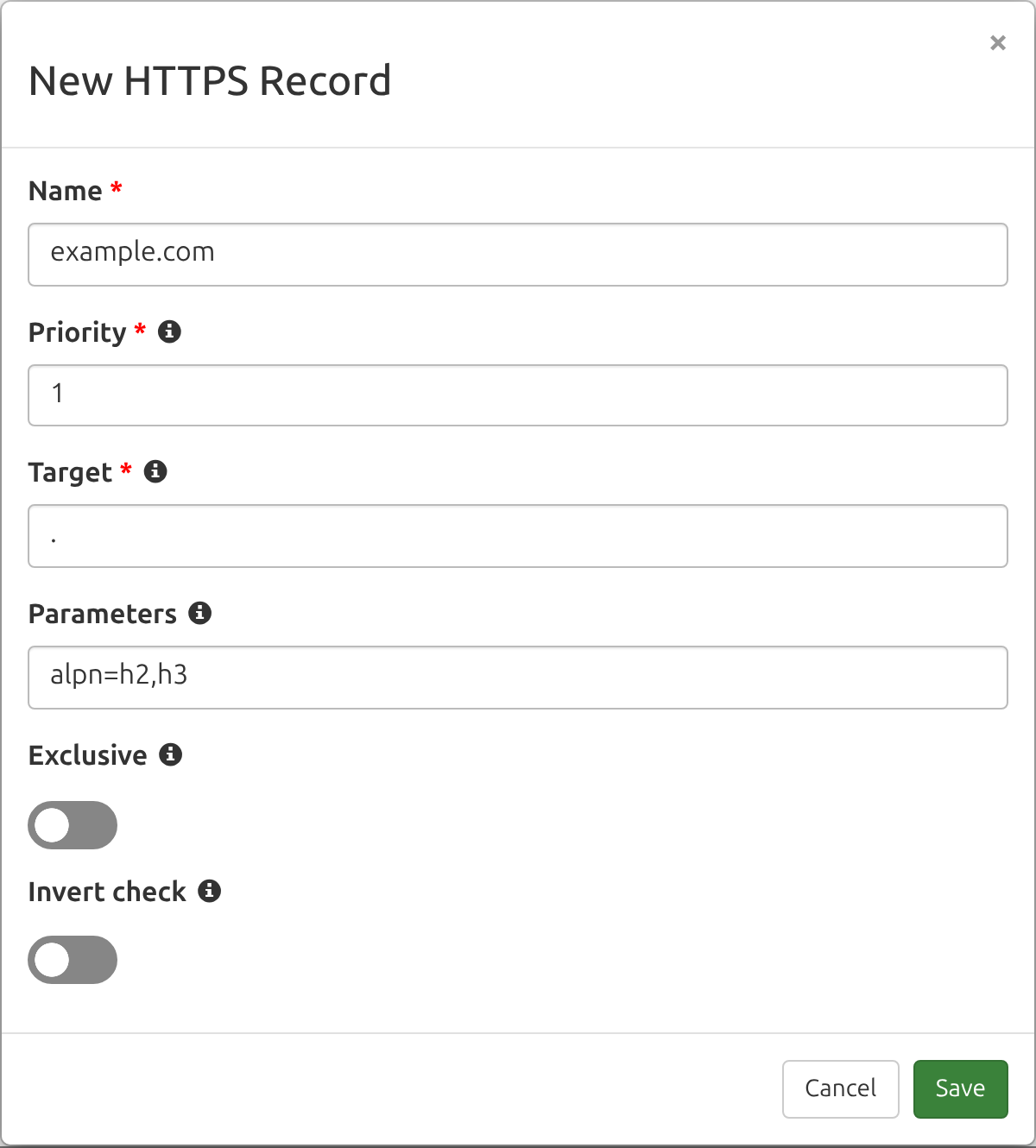
The priority, target, and parameters each get their own field, so each one can be checked and reported on separately. If you'd rather not retype what's already published, run dig without +short and paste the whole output into the zone file importer, which imports the records and ignores dig's comment lines.
One thing to know before your first check runs: RFC 9460 defines a canonical form for these records, and DNS Check rewrites both what you enter and what your name servers return into that form so the two can be compared as text. Parameters get sorted by their registry key number rather than alphabetically, quoting is dropped, keys are lowercased, and relative targets are made absolute. Enter port=443 alpn="h2,h3" and it's stored as alpn=h2,h3 port=443. The record you see afterward may not be character-for-character what you typed.
Wildcard Monitoring for the Parts That Rotate
Encrypted ClientHello is the clearest case for monitoring part of a record with a wildcard instead of an exact value. An ech parameter carries a Base64 key configuration a few hundred characters long, and it is not stable. Cloudflare publishes one for crypto.cloudflare.com:
dig +short crypto.cloudflare.com HTTPS
1 . alpn="h2" ipv4hint=162.159.135.79,162.159.136.79 ech=AEX+DQBBKgAg...Y2xvdWRmbGFyZS1lY2guY29tAAA= ipv6hint=2606:4700:7::a29f:874f,2606:4700:7::a29f:884f
The ech value is abbreviated above so it fits on the page. It's also the part that moves: two lookups a few minutes apart, while this post was being written, returned different keys.
A monitor pinned to those exact parameters would fail every time that value changes, which is noise, not a signal. So DNS Check lets you put an asterisk (*) in a monitor's priority, target, parameters, or any combination of them. Monitoring an exact priority and target with * for the parameters still catches the record being removed or repointed somewhere it shouldn't be, without alerting on a routine key rotation. The same approach works for a CDN that adjusts its address hints as its network changes.
Wildcards loosen a monitor. Two settings on the add-record form tighten it:
- An empty Parameters field isn't a wildcard. It requires the record to have no parameters at all.
- The Exclusive toggle requires the HTTPS records returned for the name to line up one-to-one with the records you monitor, so a record you never added fails the check. With a single wildcard monitor, that means the name has to publish exactly one HTTPS record, and it has to match.
Available on Every Account
HTTPS and SVCB record monitoring is available on every DNS Check plan, free accounts included. There's nothing to enable and no upgrade to buy. When a record changes, you'll hear about it through your usual notification channels: email, Slack, PagerDuty, webhooks, and the rest.
For the full reference, including every parameter, the validation rules, and zone file examples, see the HTTPS record monitoring and SVCB record monitoring documentation. If you're new here, create a free DNS Check account and start monitoring your DNS records.