
SERVFAIL ("server failure") is a DNS response code meaning the DNS server you queried couldn't produce an answer. It doesn't mean the name is missing or wrong: it means the lookup broke somewhere along the way, so the server gave up. Common culprits include unreachable or misconfigured authoritative name servers, a broken delegation, a DNSSEC validation failure, or a network problem between servers.
This page explains what a SERVFAIL error is and how to track one down, then covers how SERVFAIL errors affect DNS monitoring, and how DNS Check reports them and lets you decide how quickly you're notified.
The protocol spells it SERVFAIL. DNS Check's error messages and settings show it as "ServFail", but it's the same thing.
What Is a SERVFAIL Error?
Every DNS response carries a response code (RCODE) that says how the query went. SERVFAIL is RCODE 2, which RFC 1035 defines as:
Server failure - The name server was unable to process this query due to a problem with the name server.
In practice, SERVFAIL is DNS's catch-all error. You'll most often get one from a recursive resolver: the DNS server your device, your ISP, or a public service like Google Public DNS (8.8.8.8) or Cloudflare (1.1.1.1) uses to look names up for you. The resolver chases the answer through the root, the top-level domain, and the domain's own authoritative name servers. If any step fails in a way it can't work around, it returns SERVFAIL. The problem is usually further down that chain than the resolver you queried, and often in the queried domain's own authoritative name servers.
What a SERVFAIL Error Looks Like
With dig, the response code appears in the header's status field:
$ dig www.example.com

;; ->>HEADER<<- opcode: QUERY, status: SERVFAIL, id: 41925
;; flags: qr rd ra; QUERY: 1, ANSWER: 0, AUTHORITY: 0, ADDITIONAL: 1
With nslookup:
$ nslookup www.example.com
** server can't find www.example.com: SERVFAIL
Elsewhere, SERVFAIL is usually hidden behind a more generic message. A browser shows the same "site can't be reached" page it shows for any other failed lookup, such as Chrome's ERR_NAME_NOT_RESOLVED. Mail servers treat SERVFAIL as a temporary failure: they defer the message and retry later, logging something like "Host not found, try again".
SERVFAIL vs. NXDOMAIN, REFUSED, and Timeouts
These failures are easy to confuse, but each one points somewhere different:
| Result | What it means | Where to look |
|---|---|---|
| SERVFAIL (RCODE 2) | The server couldn't get or verify an answer. The name may well exist. | Authoritative name servers, delegation, DNSSEC, and the network between servers. |
| NXDOMAIN (RCODE 3) | A definitive answer: the name doesn't exist. | The zone's records: a typo, a deleted record, or an expired domain. |
| REFUSED (RCODE 5) | The server understood the question, but won't answer it for policy reasons. | Access controls on the server, or a server that isn't configured to serve that zone. |
| NOERROR with no answers (RCODE 0) | The name exists, but has no records of the type you asked for. | The zone's records for that name. |
| Timeout (no response) | No reply arrived at all, so there's no response code. | Connectivity, firewalls, and whether the server is running. |
The key difference between SERVFAIL and NXDOMAIN: NXDOMAIN is an answer, and SERVFAIL is the lack of one. A SERVFAIL tells you nothing about whether the record you queried is correct.
What Causes SERVFAIL Errors?
Authoritative Name Servers That Are Down or Unreachable
If none of a domain's authoritative name servers answer the resolver in time (because they're down, overloaded, under attack, or blocked by a firewall), the resolver can't get an answer and returns SERVFAIL. This is also why SERVFAIL often comes and goes: a resolver whose query to one server is lost may succeed on the next attempt, or on a different server.
Broken or Lame Delegation
The NS records at your domain registrar (the delegation in the parent zone) tell resolvers which name servers to query. If they point to servers that no longer host your domain (a lame delegation), those servers return REFUSED or nothing at all, and the resolver returns SERVFAIL. This commonly happens after moving to a new DNS provider without updating the registrar, or after the old provider deletes the zone. See NS records for how delegation works.
DNSSEC Validation Failures
Validating resolvers, including Google Public DNS, Cloudflare's 1.1.1.1, Quad9, and many ISP resolvers, return SERVFAIL rather than pass on an answer that fails DNSSEC validation, which makes DNSSEC mistakes one of the most common causes of SERVFAIL errors today. Typical triggers include:
- A DS record at the registrar that doesn't match the zone's current signing key, often after a key rollover or a change of DNS provider
- Expired signatures (RRSIG records) because the zone stopped being re-signed
- DNSSEC turned off at the DNS provider while the DS record is still published at the registrar
A resolver that doesn't validate DNSSEC resolves these names normally, so a DNSSEC problem produces SERVFAIL for some users and not others.
Zone Errors on the Authoritative Server
An authoritative server can return SERVFAIL itself when it's supposed to serve a zone but can't. For example, the zone file has a syntax error and failed to load, or a secondary server can no longer transfer the zone from its primary and has let its copy expire.
Network Problems Between Servers
Packet loss, routing problems, and firewalls that block UDP or TCP port 53 can all interrupt the resolver's lookup. Large responses (common with DNSSEC and long TXT records) may need to be retried over TCP, so a firewall that allows only UDP can cause SERVFAIL for some record types but not others.
Problems with the Resolver Itself
Sometimes the resolver really is at fault: it's overloaded, misconfigured, can't reach the Internet, or is being rate limited by the servers it queries. When one resolver returns SERVFAIL while others answer the same query correctly, suspect the resolver.
A CNAME That Leads to a Broken Domain
If a CNAME record points to a name in another domain (for example, a CDN or SaaS hostname), a SERVFAIL anywhere along that chain becomes a SERVFAIL for your name too, even though your own DNS is fine.
How Long Does a SERVFAIL Error Last?
It depends entirely on the cause:
- Transient problems (a dropped packet, a brief overload, one flaky name server) often clear within seconds or minutes. The next lookup can succeed without anyone doing anything.
- Configuration problems (a lame delegation, a mismatched DS record, a zone that failed to load) last until someone fixes them.
Resolvers don't remember a SERVFAIL for long. RFC 9520 requires them to cache a resolution failure for at least 1 second and no more than 5 minutes, so once the underlying problem is fixed, lookups recover quickly. There's no long wait for a TTL to expire the way there is after changing a record.
How to Troubleshoot a SERVFAIL Error
If You're Visiting Someone Else's Website
Try the same lookup through a different resolver, or from a different network such as your phone's cellular data. If the name resolves there, the problem is with your resolver: switching resolvers or restarting your router may help. If it fails everywhere, the problem is in the domain's DNS, and only the site's owner or their DNS provider can fix it. Clearing your browser's or computer's DNS cache won't fix a SERVFAIL caused by the domain itself.
If You Manage the Domain
Work outward from the symptom toward the cause. Replace www.example.com and ns1.example.net with your own name and name servers.
-
Compare several public resolvers. If they all return SERVFAIL, the problem is almost certainly in your domain's DNS. If only one does, suspect that resolver, or DNSSEC (not every resolver validates it).
dig www.example.com @1.1.1.1 dig www.example.com @8.8.8.8 dig www.example.com @9.9.9.9 -
Read the Extended DNS Error, if there is one. Many public resolvers attach an Extended DNS Error (EDE) explaining the SERVFAIL. Recent versions of dig print it in the
OPT PSEUDOSECTION, and it can name the cause outright:; EDE: 9 (DNSKEY Missing): (no SEP matching the DS found for example.com.) -
Rule DNSSEC in or out. The
+cd(checking disabled) flag asks the resolver to skip DNSSEC validation. If the query fails normally but succeeds with+cd, DNSSEC is the problem: compare the DS record at the parent with your zone's DNSKEY records, and check that signatures haven't expired.dig www.example.com @8.8.8.8 dig +cd www.example.com @8.8.8.8 dig DS example.com @8.8.8.8 -
Query each authoritative name server directly. List the zone's name servers, then ask each one for the record, skipping resolvers entirely. Every server should answer the same way, with the
aa(authoritative answer) flag set. A server that times out, or that returns REFUSED or SERVFAIL, is your problem server.dig NS example.com +short dig www.example.com @ns1.example.net +norecurse -
Trace the delegation.
+tracewalks the lookup from the root servers down, showing which name servers each level delegates to. Look for NS records at the parent that don't match the ones your DNS provider tells you to use.dig +trace www.example.com
An intermittent SERVFAIL is hard to catch in the act. A monitor that queries your records around the clock records when each failure started and how long it lasted, and monitoring each authoritative name server separately shows which one is at fault.
How SERVFAIL Errors Affect DNS Monitoring
A DNS monitor checks whether a record's value matches what you expect. A SERVFAIL leaves that question unanswered, which puts monitoring in an awkward position:
- It's a real failure. Any resolver that hits the same problem returns SERVFAIL to your visitors and to mail servers trying to deliver to you. A sustained one takes a site offline as surely as a deleted record.
- It's often a false alarm. Most SERVFAIL errors are brief. Because most domains have several authoritative name servers, a brief problem on one of them rarely affects real users.
DNS Check's own data bears that out. In 2015, 57% of the failures DNS Check recorded were SERVFAIL errors, and most of those had cleared by the next check 5 minutes later. The numbers for the 90 days to mid-September 2026, are similar:
- 56% of failures were SERVFAIL errors.
- 81% of SERVFAIL errors had cleared by the next check. Averaged across records, so records with frequent errors don't outweigh the rest, the figure is 66%.
- 10% of records produced 62% of all SERVFAIL errors. A record that keeps failing with SERVFAIL errors usually has a name server with a chronic problem, not a run of bad luck.
Alerting on every SERVFAIL buries the persistent problems in noise, and the natural response to noise, turning notifications off, means missing the outages that matter. A good monitoring setup records every SERVFAIL but alerts only once it lasts long enough to be worth acting on.
Intermittent SERVFAIL errors also make a record alternate between passing and failing, which DNS Check reports as flapping. A record that flaps with SERVFAIL errors usually has one unreliable name server, or a network problem between that server and some of the resolvers querying it.
How DNS Check Handles ServFail Errors
DNS Check's error messages and settings write the SERVFAIL response code as "ServFail". The rest of this page uses that spelling.
Where DNS Check's Queries Come From
By default, DNS Check looks up your records through its own recursive name servers in several locations, the same way a typical user's resolver would. A ServFail result means one of those resolvers couldn't get an answer from your DNS.
Professional and Enterprise accounts can instead set the Name servers to query for a record group, such as your authoritative name servers. DNS Check then queries those servers directly, skipping the rest of the resolution chain. When several servers are listed, DNS Check retries across all of them and reports a ServFail error only if it can't get an answer from any of them, so one unreliable server can hide behind the healthy ones. To find the misbehaving server, list a single server in each record group.
Which Errors Count as ServFail Errors
DNS Check groups three kinds of "couldn't get an answer" results under the ServFail name, and all three count toward the notification threshold described below:
| Error message | What happened |
|---|---|
| Error communicating with DNS server (ServFail). | The name server returned the SERVFAIL response code. |
| Error communicating with DNS server (ServFail: Timeout). | The name server didn't respond in time. This usually points to connectivity or an overloaded server. |
| Error communicating with DNS server (ServFail: Connection refused). | The name server refused the connection, which often means nothing is listening on port 53 or a firewall is rejecting DNS Check's queries. |
Other failures aren't ServFail errors. A wrong value, a missing record (NXDOMAIN), or an extra record on an exclusive monitor means DNS Check got an answer, and the answer was wrong. Those notify you on the first failure. See Troubleshoot DNS Records for those.
What Happens When a Check Returns a ServFail Error
- The record is marked failing right away. DNS Check can't confirm the record is correct, so it doesn't report it as passing. This applies to inverted monitors too: a ServFail doesn't show that the unwanted record is absent.
- The failure is added to the record's history. The record's History report lists state changes, whether or not you were notified: an entry when the record starts failing, and another when it passes again. Further checks that fail the same way don't add entries. While a notification is being held back, the entry says so: "Notification delayed pending 2 consecutive ServFail errors, per your notification settings."
- Notifications wait for your threshold. DNS Check counts consecutive failing checks and sends notifications (email, Slack, PagerDuty, and your other integrations) only once the count reaches your ServFail Error Notification Threshold. With the default threshold of 2, a single ServFail between two passing checks notifies no one. With a threshold of 2 or more, reaching it also adds a History entry, so the report shows two failing entries in a row: one where the failure started, and one where the notifications were sent. If the record starts failing for a different reason before reaching the threshold, such as a wrong value, DNS Check notifies right away, and that check adds the second entry.
- A quick recovery stays quiet. If the record passes again before reaching the threshold, the count resets to zero and DNS Check sends nothing, neither the failure nor the recovery, since you were never told it failed. Once you have been notified of a failure, the recovery notification follows as usual.
Here's the History report for a record whose name server times out intermittently, checked every 5 minutes with the default threshold of 2. The report lists the newest entry first, so the walkthrough below it starts with the bottom row:
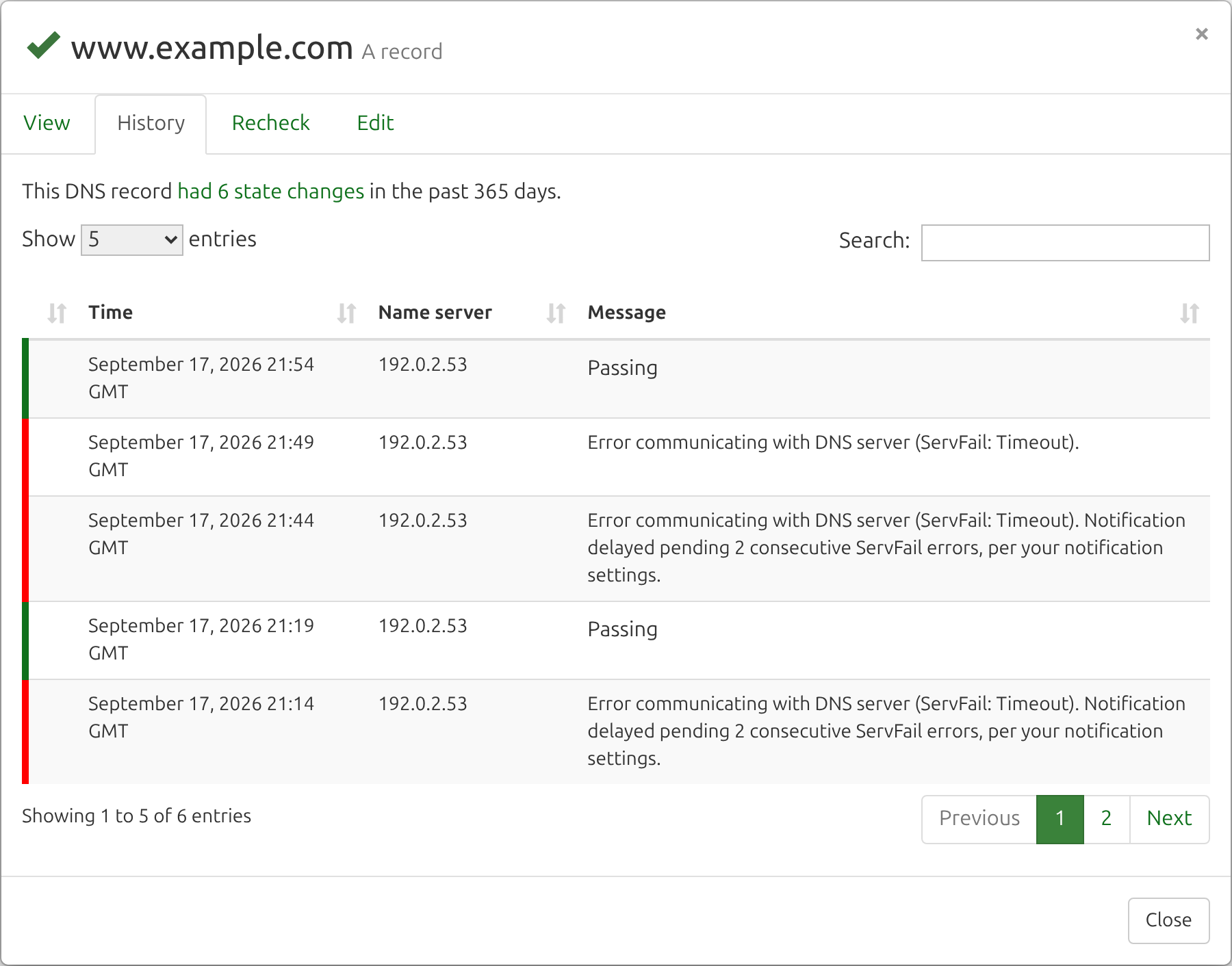
- 21:14: a ServFail error. DNS Check recorded it, but held the notification back because the threshold is 2.
- 21:19: the record passed again, so the counter reset to zero. DNS Check sent no notifications for this blip.
- 21:44: another ServFail error, again held back.
- 21:49: a second consecutive ServFail error reached the threshold, so DNS Check sent the failing notifications.
- 21:54: the record passed again, and since you'd been told it failed, DNS Check sent the recovery notifications.
The threshold delays notifications for a record that starts failing with a ServFail error. If a record is already failing for another reason and then hits a ServFail error, it's still failing, so no new notification is needed.
Configure ServFail Notifications
The ServFail Error Notification Threshold sets how many consecutive ServFail errors a record needs before DNS Check notifies you. It's available on every plan, including the free plan, and applies to every record group in your account. To change it:
- Go to the General tab of your Notification Settings page.
- Drag the ServFail Error Notification Threshold slider to the number of consecutive ServFail errors you want, from 1 to 11. The default is 2.

- Click Save.
How the Threshold Translates into Time
With a threshold of N, DNS Check notifies you on the Nth consecutive ServFail error. Records are checked every 5 minutes by default, so the delay after the first error is the threshold minus one, multiplied by 5 minutes:
| Threshold | Delay |
|---|---|
| 1 | None |
| 2 (default) | About 5 minutes |
| 3 | About 10 minutes |
| 6 | About 25 minutes |
| 11 (maximum) | About 50 minutes |
Selecting Recheck from a record's drop-down menu runs an extra check, which counts toward the threshold like any other.
Choosing a Threshold
- 1 suits records where any failure demands attention, and you'd rather investigate a false alarm than lose a few minutes.
- 2 or 3 is right for most setups. It filters out one-off blips while still catching real outages within minutes.
- Higher values cut notifications further, at the cost of hearing about a real outage later. If you raise the threshold because a DNS provider returns ServFail errors often, that's a reliability problem worth taking up with the provider, since your users hit the same errors.
Related Settings
- To silence one record group entirely, turn off its notifications. See Notification Settings.
- To find out which name server is causing ServFail errors, create a record group for each authoritative name server, with Name servers to query set to just that server (paid accounts). Cloning a record group is a quick way to set these up. Each copy counts toward your plan's record group and DNS record limits, so if you're short on room, point a single record group at one server at a time instead.
Frequently Asked Questions
Does a SERVFAIL error mean my domain is down?
Not necessarily. It means at least one DNS server couldn't finish a lookup. If your domain has several healthy name servers, most users may be unaffected. A persistent SERVFAIL, or one every public resolver returns, mean users can't reach your domain.
Can clearing my DNS cache fix a SERVFAIL error?
Rarely. Resolvers cache failures for at most 5 minutes, and a SERVFAIL caused by the domain's DNS comes right back until the domain's DNS is fixed. Switching to a different resolver can help only if the resolver you were using is the one at fault.
Why does one resolver return SERVFAIL while another works?
The most common reason is DNSSEC: a validating resolver rejects a badly signed answer that a non-validating resolver accepts. Other reasons include one resolver reaching a different, broken name server, having a network problem the other doesn't, or being overloaded itself.
Why did DNS Check report a ServFail error when my site loaded fine?
Most ServFail errors are brief, and your browser probably looked the name up at a different moment, through a different resolver, or used a cached answer. If DNS Check reports ServFail errors for a record repeatedly, look at its History report for a pattern in when they happen, then monitor each authoritative name server in its own record group to find the one at fault.
Will DNS Check notify me when a record recovers from a ServFail error?
Only if you were notified that it failed. If a record recovers before reaching your ServFail Error Notification Threshold, DNS Check sends no notifications either way, though both the failure and the recovery still appear in the record's History report.

Protect your DNS infrastructure with automated monitoring
Get notified immediately when DNS records change. Start monitoring your critical DNS infrastructure for free in under 5 minutes.
No credit card required • Cancel anytime